Built for restoration crews + general contractors

Stop juggling QuickBooks,
spreadsheets, and Drive.
Run your jobs from one place.

My Book Pad replaces the patchwork. Track jobs — claim numbers, change orders, or just an address — log receipts with photo OCR, split profit with partner workspaces, and settle up automatically. Built for the way contracting actually moves.

✓ No credit card required ✓ Full features unlocked ✓ Setup in 60 seconds
mybookpad.com/dashboard
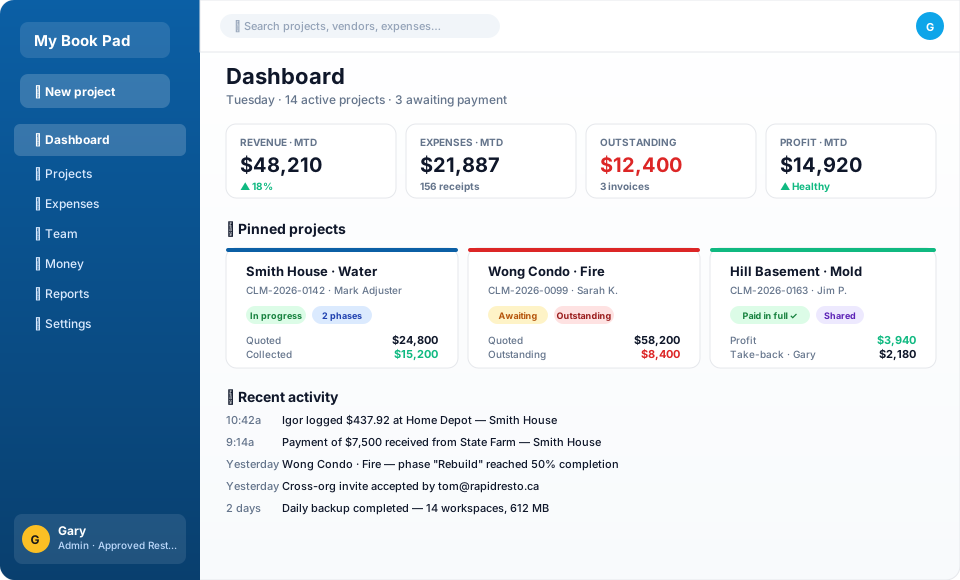
My Book Pad dashboard preview — sidebar nav, KPI stat cards for revenue and expenses, pinned project cards with claim numbers and status pills, recent activity feed
Who uses it

Two kinds of jobs, one app

Same money math, same partners, same OCR — just different fields per project so the form matches the work.

🏠

Insurance restoration

Water · Fire · Mold · Sewage

  • Claim number, adjuster, insurer, date of loss
  • Emergency + Rebuild phases on one claim
  • Paid-in-full toggle for settled-but-incomplete phases
  • Estimate PDF auto-fills client + address
🔨

General contracting

Renovations · New builds · Trade work

  • Quoted total, client, address, scope
  • Change orders without rewriting the original quote
  • Progress-billed payments tracked separately
  • Multi-phase projects for staged work (foundation → framing → finishing)

Receipts, partners, profit splits, cross-org collaboration, and settle-up math work identically across both. Mix Insurance and Retail projects in the same workspace — pick the right type when you create each job.

Why My Book Pad

Everything a working contractor needs

Designed for the way real jobs flow — restoration claims, GC renovations, builds, or trade work.

🏠

Two project types out of the box

Insurance tracks claim numbers, adjusters, dates of loss, and Emergency/Rebuild phases. Retail handles GC work — quotes, change orders, and progress billing. Pick the right form per job.

📷

Receipt OCR built in

Snap a receipt with your phone — Gemini vision reads the vendor, total, and date. Auto-categorized. No typing required.

🤝

Cross-workspace collaboration

Sub out part of a job to another contractor? Invite them as a partner workspace. They log their own expenses; settle-up math handles the rest.

💰

Profit-split aware

Partners, employees, and external workspaces all factor into the math. You always know exactly who owes whom — to the penny.

📱

Mobile-first PWA

Add to your iPhone or Android home screen — works like a native app. Field crew can log receipts on the truck without losing them.

🔒

Your data, your control

Per-workspace SQLite. Export anytime. Delete anytime. No selling your job data to ads or AI training.

💰 Money tab

Profit splits, calculated automatically.

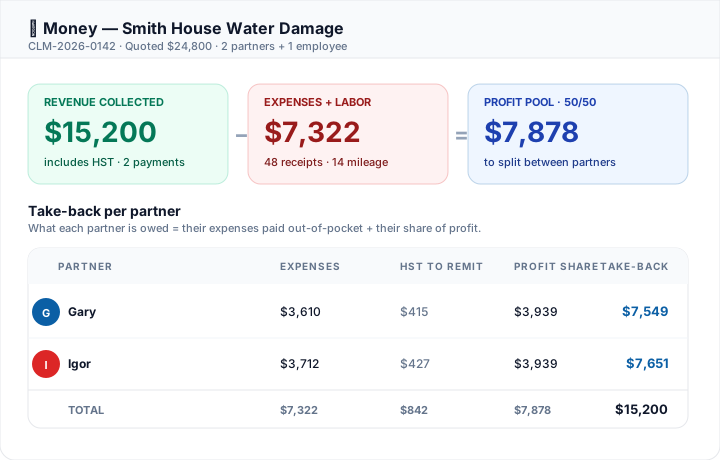
The math you used to do on a notepad — Revenue minus Expenses minus partner shares minus HST — happens live, every time you log an expense or collect a payment. Avatars on every row so it's instantly obvious who's owed what.

  • Per-partner take-back, updated in real time
  • HST-to-remit column so each partner handles their own sales tax
  • Cross-org aware — partner workspace expenses fold in automatically
  • Export as CSV or PDF for accountant handoff
Money tab showing the profit-split breakdown — Revenue collected $15,200 minus Expenses $7,322 equals Profit pool $7,878, then a Take-back per partner table with Gary and Igor's individual amounts
📷 Receipt OCR

Snap a photo. Done in 10 seconds.

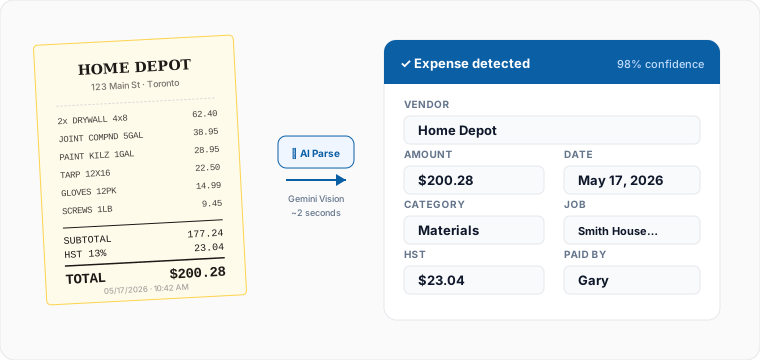
Sitting in the truck cab after a Home Depot run? Open the app, tap "+ Expense", point your phone at the receipt. Vendor, total, date, HST, and a sensible category come back populated. Tap once to assign to the job. Move on.

  • Google Gemini Vision — ~95% accuracy on clear receipts
  • Auto-learns your category preferences over time
  • Detects HST separately so tax reporting is correct
  • Works offline — photo queues + syncs when you're back on signal
A photo of a Home Depot receipt on the left with an arrow labeled AI Parse pointing to a structured expense form on the right that has vendor, amount, date, category, and HST all auto-filled
Why not just…

How My Book Pad compares

Side-by-side with the tools restoration contractors usually try first.

Feature My Book Pad QuickBooks FreshBooks Spreadsheets
Insurance-specific fields (claim #, adjuster, date of loss)
Emergency + Rebuild phases on one project manualif you remember
Receipt photo → parsed expense (OCR) photo onlyno auto-fill photo only
Partner profit splits + take-back math DIY formulas
Cross-company workspace collaboration
Per-partner HST/sales tax reporting workspace-wide workspace-wide DIY
Mobile PWA (installable, offline-capable) native app native app
Flat pricing (no per-seat) per user per user
Daily encrypted backups + 30-day restore manual manual
Change orders without rewriting the original quote workaround workaround
Starts at (USD / month) $39company-wide · unlimited users $30+per user $19+per user $0+ your hours

QuickBooks and FreshBooks are great accounting tools — they're not built for the way restoration jobs flow. My Book Pad sits where they leave off.

How it works

From signup to first settle-up in an afternoon

No onboarding calls. No training videos. Just sign up and start logging.

1

Create your workspace

Pick a workspace name, confirm your email, and you're in. Full 3-month trial, every feature unlocked.

2

Add your first job

Restoration? Drop in the insurance estimate PDF — claim number, adjuster, address all auto-fill. GC work? Quick form with quoted total, client, and address. Phase it however the work splits.

3

Log expenses as you go

Snap a receipt photo from the truck. OCR fills it in. Assign to the job. Done in 10 seconds.

Pricing

Simple — one plan

No per-seat scams. No "Enterprise — call us." One price, every feature. All prices in US dollars.

Basic
$39 USD / month

For solo operators running a handful of jobs at a time.

  • Up to 5 active projects
  • Unlimited team members
  • Photo OCR for receipts
  • Cross-org collaboration
  • Email support
Start free trial
Enterprise
$199 USD / month

For larger restoration operations with high project volume.

  • Unlimited projects
  • Everything in Pro
  • Dedicated onboarding
  • Custom contracts
  • SLA + phone support
Start free trial

All plans start with a 3-month free trial. No card required to try.

FAQ

Common questions

Don't see your answer? Email support@mybookpad.com.

Is this only for insurance restoration, or also for general contractors?

Both. Insurance restoration crews use it with claim numbers, adjusters, and Emergency + Rebuild phases. General contractors use it with quotes, change orders, and progress billing on renovations, builds, and trade work. The Project Type picker (Insurance vs Retail) tells the app which fields to show; everything else — receipts, partners, profit splits, cross-org collaboration, settle-up — applies equally to both.

What happens after the 3-month trial?

If you don't subscribe, your workspace becomes read-only — you can still log in and see everything, but you can't add new expenses, payments, or projects until billing is set up. Your data is kept safely either way for at least 30 days.

How does the cross-org collaboration work?

If you sub out part of a job to another contractor who also uses My Book Pad, you can invite them to collaborate on that specific project (or all your projects). They log their own expenses on the shared job; both sides see the work; settle-up math tracks who owes whom.

Can I cancel anytime?

Yes. Manage your subscription from Org Settings → Billing → Manage subscription. Cancellation is immediate (you keep access until the end of the current billing period). No "talk to retention" runaround.

What about my data — privacy, exports, deletion?

Each workspace has its own SQLite database. We don't share your job data with anyone. You can export to CSV from any list page. You can delete your workspace yourself from Org Settings → Danger zone (30-day grace period for restore).

Does receipt OCR really work?

It uses Google Gemini's vision model. Vendor, total, date, tax, and category come back populated about 95% of the time for clear receipts. Smudged or angled photos can miss — but you can edit anything OCR fills in before saving.

Stop chasing receipts in your truck cab.

3 months free. No card. Setup takes 60 seconds.

Start free trial →